EC-Lab® is BioLogic’s software package for planning, running, processing, displaying and modelling electrochemical experiments. Multiple compatible potentiostats can be managed through one interface. This review retains the functions described in the 2018 article; technique, hardware and networking availability must be checked for the actual instrument and software version.
A configurable interface
User profiles retain plot and toolbar preferences. Supported network connections allow remote instrument access; multichannel systems can support channel grouping and synchronisation. Sequences assembled from techniques can be saved as custom applications. Check the original article’s limit of 100 applications against the documentation for the installed version.
Preparing an experiment
The 2018 article described more than 80 techniques covering voltammetry, EIS, corrosion and energy research. Available techniques depend on instrument options and software version.
Experiments can be configured through technique menus or by entering parameter values in tables. Many supported parameters can be modified during a run, with changes recorded in the raw data file. The interface can be arranged around the user’s workflow.
The earlier description also mentioned email notifications. Check their availability in the installed release and compatibility with your institution’s email environment.
Processing and interpreting results
Built-in processing and analysis complement acquisition, covering classical electrochemistry, voltammetry, EIS, corrosion and energy applications. These tools assist the work; results still require assessment of experimental conditions, model assumptions and data quality.
The retained menu illustration shows routes between processing windows. Fits and measurements can be displayed together to compare model behaviour with the experimental curve.
Display and fitting
The graphical tools include three-dimensional plots and custom graph templates. Processing functions can create variables and mathematical transformations for the x, y1 and y2 axes.
Electroanalytical tools include peak position/height, convection-wave analysis, integration, Tafel fitting and polarisation resistance. Classical fitting options include linear, polynomial and multiple-exponential models. Analysis results can be stored separately from raw measurements.
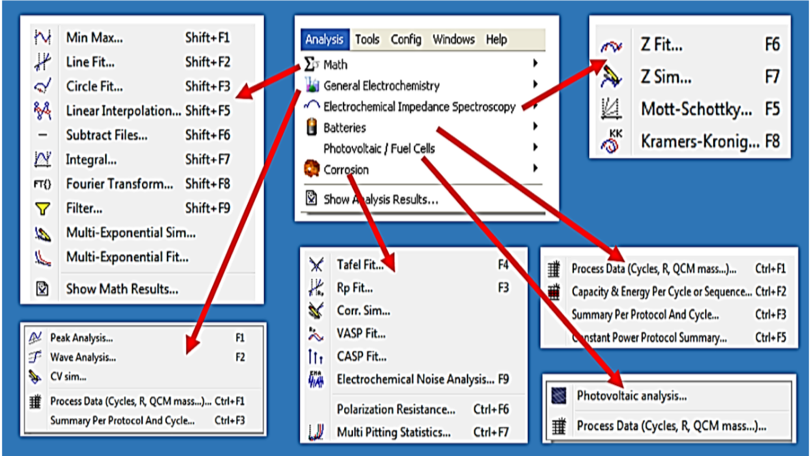
ZFit fits EIS data using equivalent circuits. The original description listed more than 150 standard circuits, two minimisation algorithms and thirteen element types: R, C, L, Q, W, G, Wd, M, Ga, Gb, La, Ma and Mq. This is a version-specific list. A large element library does not establish that a chosen model is appropriate: assess residuals, parameter uncertainty and physical interpretation.
Simulation
Simulation tools for CV, Tafel plots and EIS help explore mechanisms, compare literature models with measurements and support teaching. CVSim can generate theoretical curves for single electron-transfer steps or sequences of steps, including mechanisms coupling electron transfer and chemical reactions. The original examples included E, successive E steps and EC mechanisms.
Experimental limits
Experimental limits can terminate a step or redirect a sequence and help protect the cell. Limits may apply across a sequence or to an individual technique. Where supported, a signal from an external device, such as a temperature sensor, can trigger an action. Confirm both signal compatibility and the actual response in the planned configuration.
Compatibility and updates
The 2018 list of Windows XP/7/8/10 versions is historical, not a current installation recommendation. Check the operating system, firmware, instrument and drivers together in the selected release’s documentation. Downloads and release information are available through BioLogic’s EC-Lab support page.